Want to turn this into production assets?
Open Vibart to generate images or videos, then finish brand text, crops, and export-ready layouts on the canvas.
Introduction
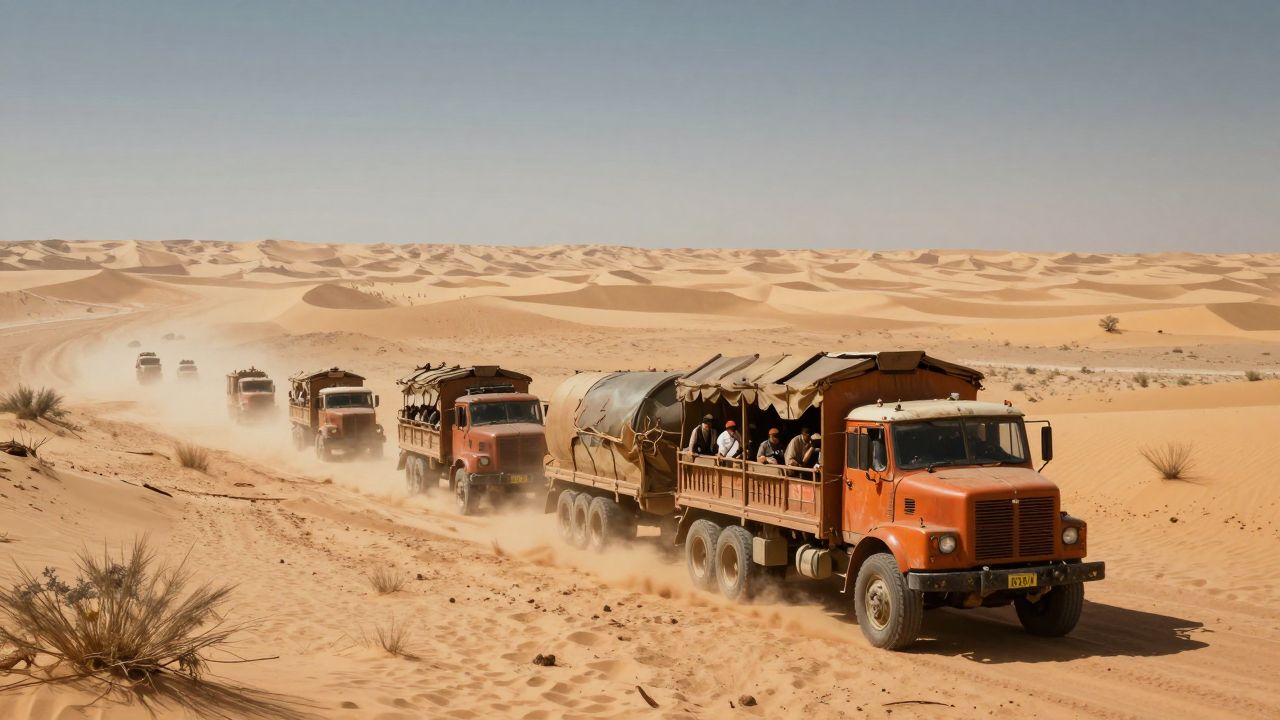
Community showcases are more than inspiration — they are reverse-engineering opportunities. When a creator shares a finished cinematic frame, the prompt, composition choices, and finishing steps reveal a repeatable workflow. This article breaks down a post-apocalyptic desert convoy battle generated in Vibart, showing how to turn a single image generation into a production-ready asset pipeline.
Deconstructing the Prompt
The source prompt is concise: "Post-apocalyptic desert convoy battle." Four words, yet they carry implicit decisions:
- Setting: desert, harsh light, dust atmosphere
- Era: post-apocalyptic — improvised armor, scavenged vehicles, weathered textures
- Action: convoy battle — motion, conflict, multiple focal points
- Genre: cinematic — wide aspect, dramatic lighting, depth of field
In practice, effective prompts for cinematic work layer these elements explicitly: environment descriptors ("golden hour," "volumetric dust"), material cues ("rusted metal," "tattered fabric"), camera language ("low angle," "anamorphic flare"), and mood keywords ("gritty," "high contrast"). Adding negative prompts — "clean," "pristine," "studio lighting" — helps suppress unwanted polish.
Visual Direction & Composition
The community image demonstrates several compositional principles that translate across AI generation and manual finishing:
Layered depth — Foreground vehicle details, mid-ground convoy formation, background dust storms and distant terrain. This depth lets you isolate elements later for cropping or repositioning.
Directional lighting — Strong key light from a low sun creates long shadows and rim lighting on metal surfaces. Specifying light direction in prompts ("backlit," "side lighting") reduces relighting work in post.
Color palette control — Desaturated earth tones with selective saturation on warning lights, fire, or fabric accents. A constrained palette makes brand-color injection easier during canvas editing.
Motion suggestion — Motion blur on wheels, dust trails, tilted horizons. These cues sell kinetic energy without requiring video generation, though they also serve as strong reference frames for image-to-video workflows.
Canvas Finishing Workflow
Moving from a flat generation to an editable canvas unlocks the production value. A typical finishing sequence:
1. Reference-guided editing — Import the generated image as a reference layer. Use inpainting or region-specific regeneration to fix artifacts: distorted wheels, inconsistent perspective, garbled text on signage. 2. Layer separation — Extract foreground, mid-ground, and background into separate canvas layers. This enables independent color grading, atmospheric effects, and parallax animation if exporting to video. 3. Typography integration — Add title treatments, calls-to-action, or spec callouts with full font control. For ecommerce or ad variants, create text layers that swap per aspect ratio. 4. Crop variants — Generate 16:9, 9:16, 1:1, and 4:5 crops from the same layered canvas. Adjust layer positions per crop to keep key subjects in safe zones. 5. Brand consistency pass — Apply brand color overlays, logo placement, and style tokens across all variants. Reference editing ensures new elements match the established lighting and texture. 6. Production-ready export — Export layered PSD, multi-page PDF, or optimized web assets (WebP, AVIF) with color profiles intact.
Adapting for Production Use Cases
The same workflow serves multiple outputs:
- Concept art & pitch decks — High-res layered files for art direction reviews.
- Ecommerce hero images — Swap convoy vehicles for product shots; keep dust atmosphere and lighting rig.
- Social ad variants — 9:16 for Reels/TikTok, 1:1 for feed, 4:5 for Stories — each with repositioned typography.
- Video pre-vis — Animate separated layers with subtle camera push, dust particle systems, and flickering fire for motion comps.
Key Takeaways
- Treat short prompts as starting skeletons; expand with camera, material, and atmosphere vocabulary for controllable results.
- Design for layers from the first generation — compose with separation in mind.
- Reference editing is the bridge between "cool image" and "usable asset."
- A single canvas session can yield dozens of production variants when crop, typography, and brand layers are systematized.
Next time you see a community piece that matches your brief, don't just save it — deconstruct it. The prompt is the seed; the canvas is where the workflow lives.
Sources and further reading
The workflow and platform rules in this article are grounded in these primary references. Confirm current rules for your market and channel before publishing.
- Vibart community work: Post-apocalyptic Desert Convoy BattleVibart community · 2026-01-09
Next step: make one asset with the same workflow
Do not stop at the comparison page. Upload a reference, generate a direction, then keep copy and brand elements editable on the canvas.