Comparing Lovart or AI design agents? Test the production workflow.
Generate with references, then finish headlines, logos, offer text, crops, and export-ready layouts in the Vibart canvas.
What the Steampunk Horse Car Project Reveals About AI Creative Workflows
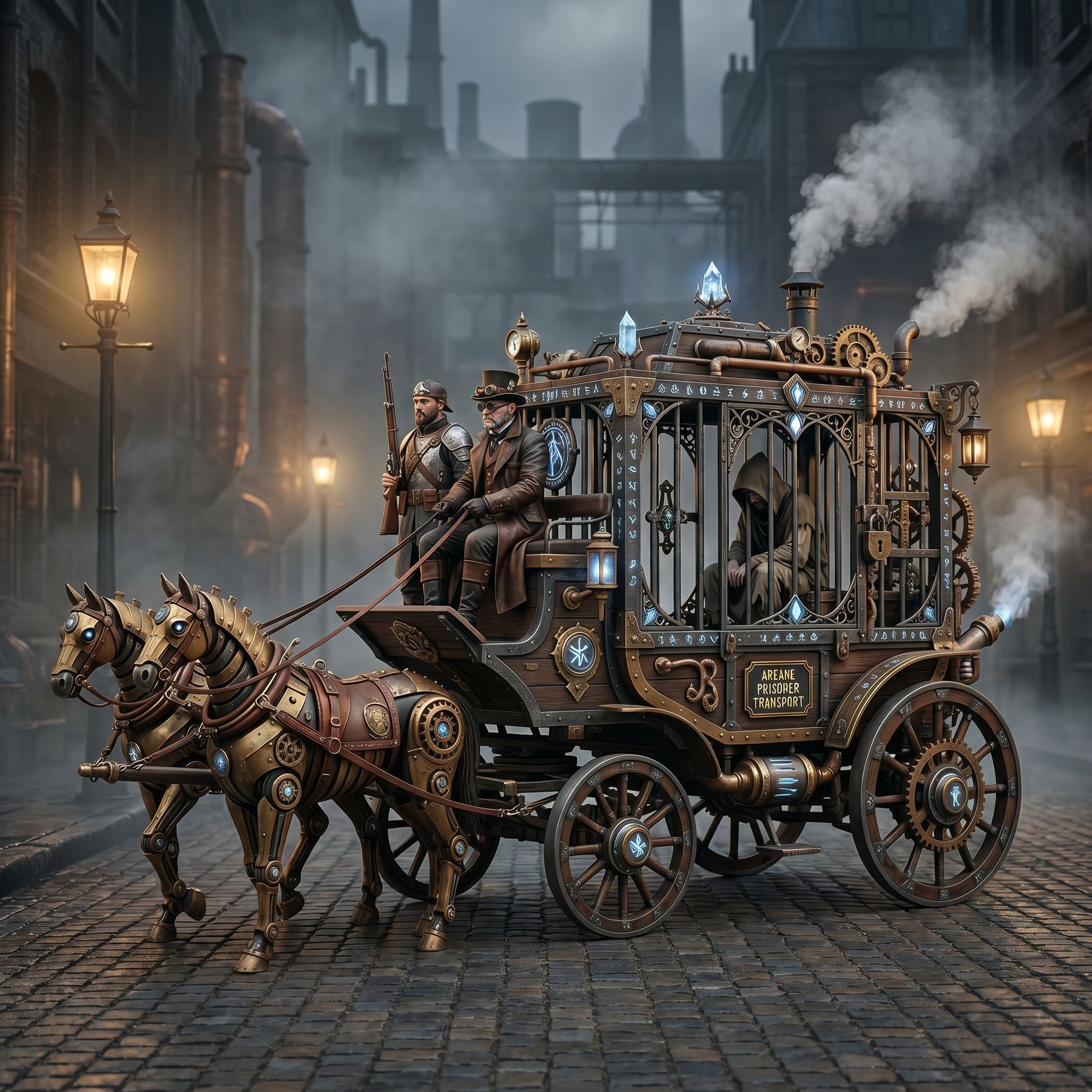
Community projects often serve as the best case studies for practical AI creative workflows. The Steampunk Horse Car, a recent community entry in the Game Design category, demonstrates how a single creative direction — converting a visual style into an Unreal Engine rendering aesthetic — can guide an entire production pipeline from concept to finished asset.
For designers, ecommerce sellers, and marketers evaluating AI creative workspaces, this project offers concrete lessons about prompt strategy, reference-guided editing, and the finishing steps that separate a rough generation from a production-ready export.
Prompt Strategy: Defining the Visual Direction
The prompt behind the Steampunk Horse Car reads: "把这个风格转换成 unreal engine 渲染的风格" — a directive to convert the existing visual style into an Unreal Engine rendering style. This is a style-transfer prompt, and it reveals a critical workflow principle: the most effective AI image generation prompts do not describe what to create from scratch. They define a transformation direction.
When creators want to adapt a concept for a specific rendering engine, game asset pipeline, or brand aesthetic, the prompt becomes a bridge between an existing visual identity and a target output. This approach applies directly to ecommerce product imagery, where sellers may need to take a product photo and render it in a consistent stylistic framework across an entire catalog.
Reference-Guided Editing and Style Consistency
The project's visual direction points to a broader workflow pattern: reference-guided editing. Rather than relying on free-text prompts alone, creators can use a source image or visual reference to anchor the output. This is especially relevant for teams maintaining brand consistency across marketing assets, product images, or game design documentation.
In practice, this means an AI creative workspace should support uploading reference images and applying their visual language — color palette, lighting, texture, and rendering style — to new generations. Creators building ecommerce creatives or ad visuals benefit from this capability because it reduces the iteration cycles needed to hit a consistent look.
Canvas Finishing: From Generation to Production-Ready Export
A generation alone is rarely production-ready. The Steampunk Horse Car project, like many community works, implies a finishing process where the initial output is refined through canvas-based editing. This includes adjusting layers, cropping variants for different platforms, controlling typography overlays, and preparing exports at the resolutions and formats required by ad networks, marketplaces, or game engines.
For marketers and ecommerce sellers, this finishing stage is where AI creative workflows deliver the most operational value. The ability to generate a base image and then edit it on an editable canvas — adjusting crop variants for social posts, product listings, or banner ads — collapses the gap between concept and deployment.
Choosing an AI Creative Workspace: A Neutral Buyer's Lens
When comparing AI creative workspaces, creators should evaluate tools against their specific workflow needs rather than brand positioning. Key criteria include:
- Image and video generation quality across different asset types
- Reference-guided editing capabilities for maintaining visual consistency
- Editable canvas layers that support non-destructive refinement
- Ecommerce and marketing asset templates with production-ready export options
- Typography control and crop variant management for multi-platform deployment
Some creators search for alternatives to established platforms when their current workflow lacks canvas-based editing or reference-guided features. Others compare AI creative workspaces to find tools that better support their specific pipeline — whether that is game design visualization, product image generation, or ad creative production. The right choice depends on which workflow steps matter most to your team.
Applying These Lessons to Your Creative Pipeline
The Steampunk Horse Car project illustrates a workflow that any creator can adapt: define a clear visual direction through prompt engineering, use references to anchor consistency, generate the base asset, and finish it on an editable canvas for production-ready output. Whether you are building game design assets, ecommerce product imagery, or marketing campaigns, this pipeline reduces guesswork and accelerates delivery.
AI creative workspaces that support this full range of capabilities — from generation through canvas finishing — give creators the flexibility to iterate faster and export assets that are ready for real-world use.
Sources and further reading
The workflow and platform rules in this article are grounded in these primary references. Confirm current rules for your market and channel before publishing.
- Vibart community work: Steampunk Horse CarVibart community · 2026-04-27
Next step: make one asset with the same workflow
Do not stop at the comparison page. Upload a reference, generate a direction, then keep copy and brand elements editable on the canvas.