Comparing Lovart or AI design agents? Test the production workflow.
Generate with references, then finish headlines, logos, offer text, crops, and export-ready layouts in the Vibart canvas.
What the Steampunk Horse Car teaches about restyling on an AI creative canvas
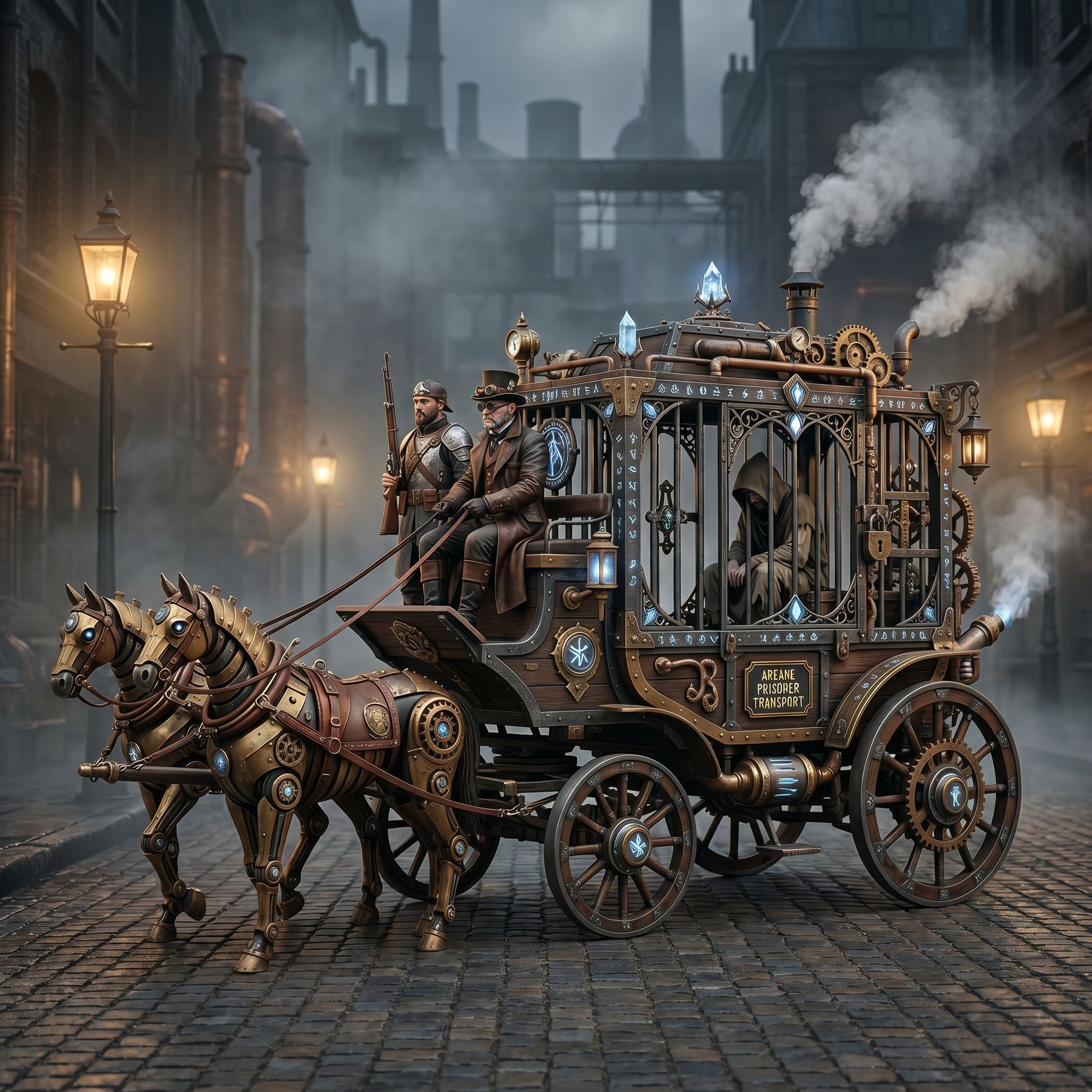
A single community piece often tells a bigger story than its stats. Steampunk Horse Car, submitted to the Vibart community in the Game Design category on 2026-04-27, started as an illustration in one visual language. The creator's prompt, "把这个风格转换成 unreal engine 渲染的风格" — convert this style into an Unreal Engine render look — captures one of the most common tasks in modern concept work: take an image you already trust and push it toward a different finish without losing the idea underneath.
For teams evaluating an AI design agent alternative or a Lovart competitor, this is the move that matters. Style transfer is not the goal. Preserving a recognizable silhouette, prop arrangement, or brand cue while changing the rendering language is the goal, because that is what lets the same concept travel from a sketch to a pitch deck to a key art frame.
Why reference-guided restyling is the core of an AI image generation workflow
Restyling with a reference is fundamentally different from prompting from scratch. A text-only prompt has to describe a vehicle that does not exist yet, which usually produces generic shapes and forgettable details. A reference-led workflow hands the model something it can anchor to: a chassis shape, a steam stack, a wheel arrangement, a particular ornament on the hood.
This is also why reference image editing and brand consistency keep showing up in searches alongside AI design canvas workflows. When a creative director can say, "keep this product silhouette, render it like an Unreal Engine cinematic frame, output three crops," the iteration loop shortens dramatically. You are not redrawing the car every time. You are adjusting one variable at a time on top of a stable base.
For ecommerce product image generation, the same pattern applies: keep the bag, the bottle, the sneaker recognizable, and let the rendering style change from flat catalog shot to lifestyle composite to a stylized hero render.
A step-by-step workflow on a Vibart canvas
Treat the canvas as a layered production surface rather than a single prompt box. The Steampunk Horse Car is a good template because it combines several capabilities that buyers usually look for separately: image generation, video-ready still output, reference-guided editing, and canvas-based composition.
1. Anchor the reference. Drop the original illustration onto a canvas layer. Treat it as the immovable object. Everything else is a derivative of it.
2. Lock the silhouette before changing the language. Use masking or a layered trace so the car body, wheels, and chimney stay in roughly the same proportions. If the silhouette drifts on every iteration, downstream use cases — pitch decks, store thumbnails, ad creatives — break visually.
3. Drive the new style through a focused prompt. The community prompt is short and directional, which is the right instinct. A prompt like "Unreal Engine cinematic render, volumetric lighting, subsurface on metal, depth haze" is more productive than a paragraph that re-describes the entire scene. The reference carries the scene; the prompt carries the finish.
4. Iterate on the canvas, not in a chat thread. Put the original and the new render side by side. Adjust lighting, material, and camera until the new version still reads as the same car. This is where an editable canvas with crop variants pays off, because you can verify hero, square, and vertical crops from the same composite.
5. Add typography and marketing layers last. Once the visual is locked, drop a title, a tagline, or a callout on top. Keeping type on a separate layer means the same render can serve a Steam capsule, a LinkedIn post, and an Instagram reel without re-rendering the art.
6. Export production-ready assets. The point of an AI creative workspace comparison is usually "can I actually ship from it." Final exports should include transparent or background variants, multiple aspect crops, and stills ready to be sequenced into an AI video generation for ads pipeline.
Lessons for ecommerce and marketing teams
The same workflow applies to ad creatives, even though the Steampunk Horse Car lives in Game Design. Reference editing gives a brand a way to keep product truth while exploring seasonal visual directions. A canvas workflow lets a team try four holiday treatments of the same product image without regenerating the product each time. Crop variants mean a hero shot, a 1:1 ad tile, and a 9:16 story version come from one composite, which is where AI creative workspace comparisons usually reveal their real value.
For teams that came in searching for a Lovart alternative AI design canvas, the practical question is not which tool wins a feature checklist. It is whether the workspace lets a designer anchor a reference, change a finish, iterate visibly, and export everything a campaign needs. The Steampunk Horse Car is a small example, but it shows every one of those steps in a single canvas.
Sources and further reading
The workflow and platform rules in this article are grounded in these primary references. Confirm current rules for your market and channel before publishing.
- Vibart community work: Steampunk Horse CarVibart community · 2026-04-27
Next step: make one asset with the same workflow
Do not stop at the comparison page. Upload a reference, generate a direction, then keep copy and brand elements editable on the canvas.