Want to turn this into production assets?
Open Vibart to generate images or videos, then finish brand text, crops, and export-ready layouts on the canvas.
Mastering Steampunk Aesthetics: A Practical AI Creative Workflow for Vibart
AI creative workspaces have transformed how designers approach visual storytelling. The Vibart community spotlight on the Steampunk Horse Car offers a concrete example of how reference-driven workflows can produce distinctive, market-ready assets. This article walks through the complete pipeline — from selecting a reference style to finalizing production-ready exports — so you can replicate the process in your own projects.
The Reference-Driven Workflow
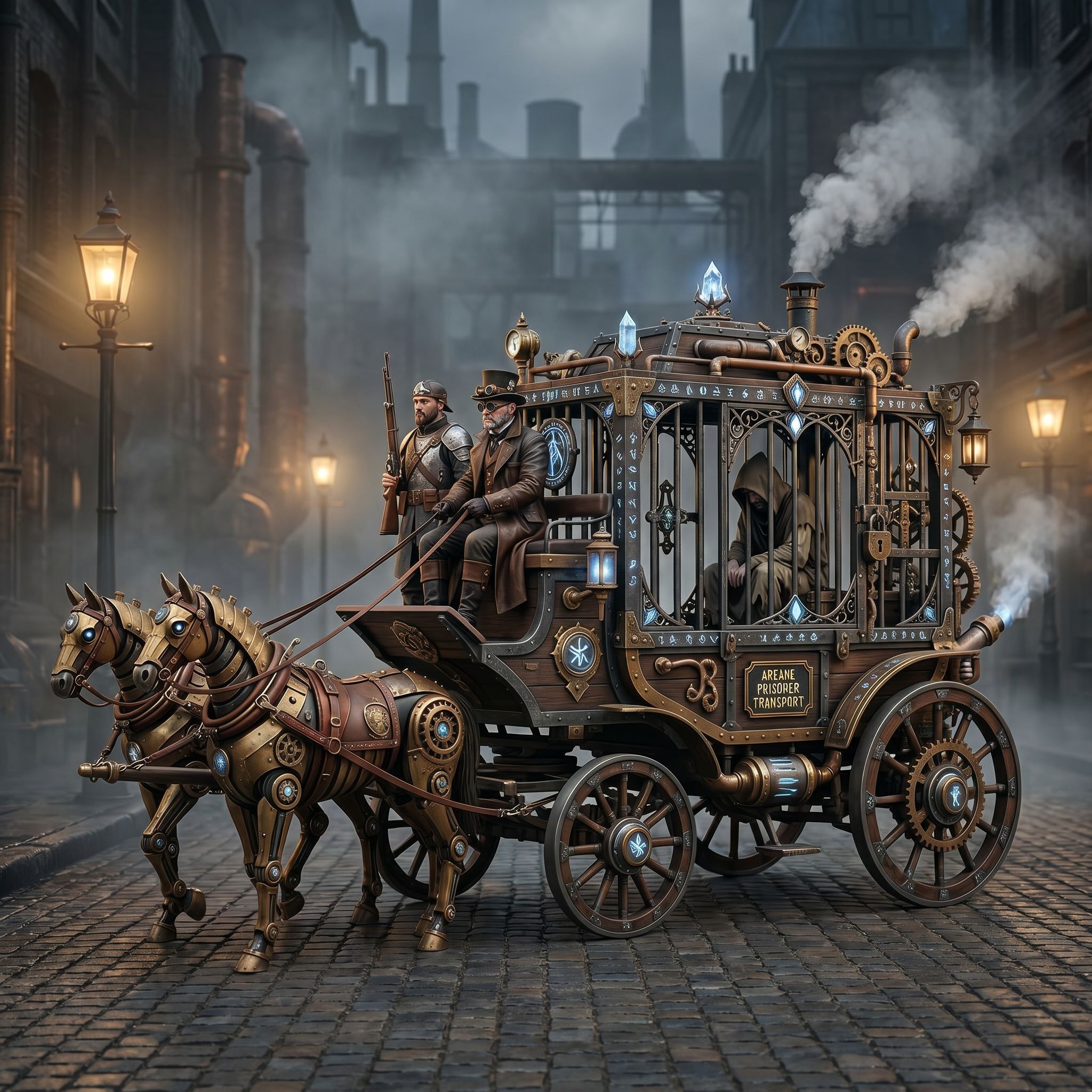
The Steampunk Horse Car was created by leveraging a community-generated image as a visual anchor. The original reference captures a mechanical Victorian design: brass gears, copper piping, and exposed machinery integrated into a horse-drawn vehicle. This single image serves as a style blueprint, establishing color palette (burnt orange, rust, deep teal), texture direction (patina, weathering), and compositional language (low-angle perspective, dramatic lighting).
In Vibart, the reference image is imported into the canvas workspace where it becomes the baseline for subsequent edits. Designers can use the image as a layer mask, a color reference, or a structural guide. The community prompt "把这个风格转换成 unreal engine 渲染的风格" (convert this style to Unreal Engine rendering style) demonstrates how a simple style instruction can dramatically shift the visual identity of a reference while preserving its core aesthetic.
Prompt Engineering for Style Conversion
Effective prompt engineering is the bridge between reference and transformation. The Steampunk Horse Car example uses a two-stage approach:
1. Style Anchor: The original prompt establishes the base aesthetic — steampunk, mechanical, industrial. 2. Rendering Shift: The additional instruction to "convert to Unreal Engine rendering style" directs the AI toward physically-based rendering (PBR) characteristics — realistic material shaders, global illumination, and volumetric lighting.
Designers can adapt this pattern for other projects. For ecommerce product shots, pair a product reference with "cinematic lighting" or "product photography" to achieve professional retail looks. For marketing banners, add "bold typography" or "dynamic composition" to guide the AI toward attention-grabbing layouts.
Canvas Editing and Layer Control
Vibart’s editable canvas layers are where the real value emerges. After the reference image is imported, designers can:
- Mask and refine: Use layer masks to isolate mechanical components, then apply selective color adjustments or texture overlays.
- Composite elements: Import additional assets (e.g., steam particles, background environments) and composite them with the reference using non-destructive blending modes.
- Typography control: Add editable text layers for labels, signs, or interface elements, then style them with Vibart’s typography engine for consistent branding.
The Steampunk Horse Car workflow shows how canvas layers enable iterative refinement. A rough sketch layer can be replaced with a clean mechanical detail layer, while a background texture layer provides atmospheric depth without cluttering the main subject.
Production-Ready Exports
Final outputs must meet specific technical requirements for their intended use. For ecommerce, this means high-resolution exports (300 DPI) with transparent backgrounds where needed. For marketing, consider multiple crop variants to suit different aspect ratios. Vibart’s export tools automate these settings, but understanding the underlying options helps you choose the right preset for each project.
Key export considerations include: - Resolution: Aim for at least 2:3 or 16:9 ratios depending on the platform. - Color profile: sRGB for web, Adobe RGB for print. - File format: PNG for transparency and quality, JPEG for web optimization.
Key Takeaways for Designers and Ecommerce Creators
- Start with a strong reference: A single high-quality image can define an entire visual language.
- Use style conversion prompts: Simple, specific instructions can transform a reference into a different rendering paradigm.
- Leverage canvas layers: Non-destructive editing allows you to iterate without starting over.
- Plan exports early: Choose the right crop and resolution before generating the final image.
By following this workflow, designers can produce consistent, high-quality AI-generated assets that feel intentional and polished — whether for game design, ecommerce product imagery, or marketing campaigns.
Conclusion
The Steampunk Horse Car community project demonstrates that AI creative workflows are not about replacing human judgment but augmenting it. By grounding AI generation in a strong reference and applying deliberate prompting and layer management, creators can achieve professional results efficiently. Vibart’s community-driven approach makes this possible for anyone, from solo designers to full marketing teams.
Ready to build your own AI creative workflow? Start experimenting with reference images and style conversion prompts in Vibart today.
CTA: Start Your AI Creative Workflow
/workflow-vibart
Sources and further reading
The workflow and platform rules in this article are grounded in these primary references. Confirm current rules for your market and channel before publishing.
- Vibart community work: Steampunk Horse CarVibart community · 2026-04-27
Next step: make one asset with the same workflow
Do not stop at the comparison page. Upload a reference, generate a direction, then keep copy and brand elements editable on the canvas.