Comparing Lovart or AI design agents? Test the production workflow.
Generate with references, then finish headlines, logos, offer text, crops, and export-ready layouts in the Vibart canvas.
Introduction
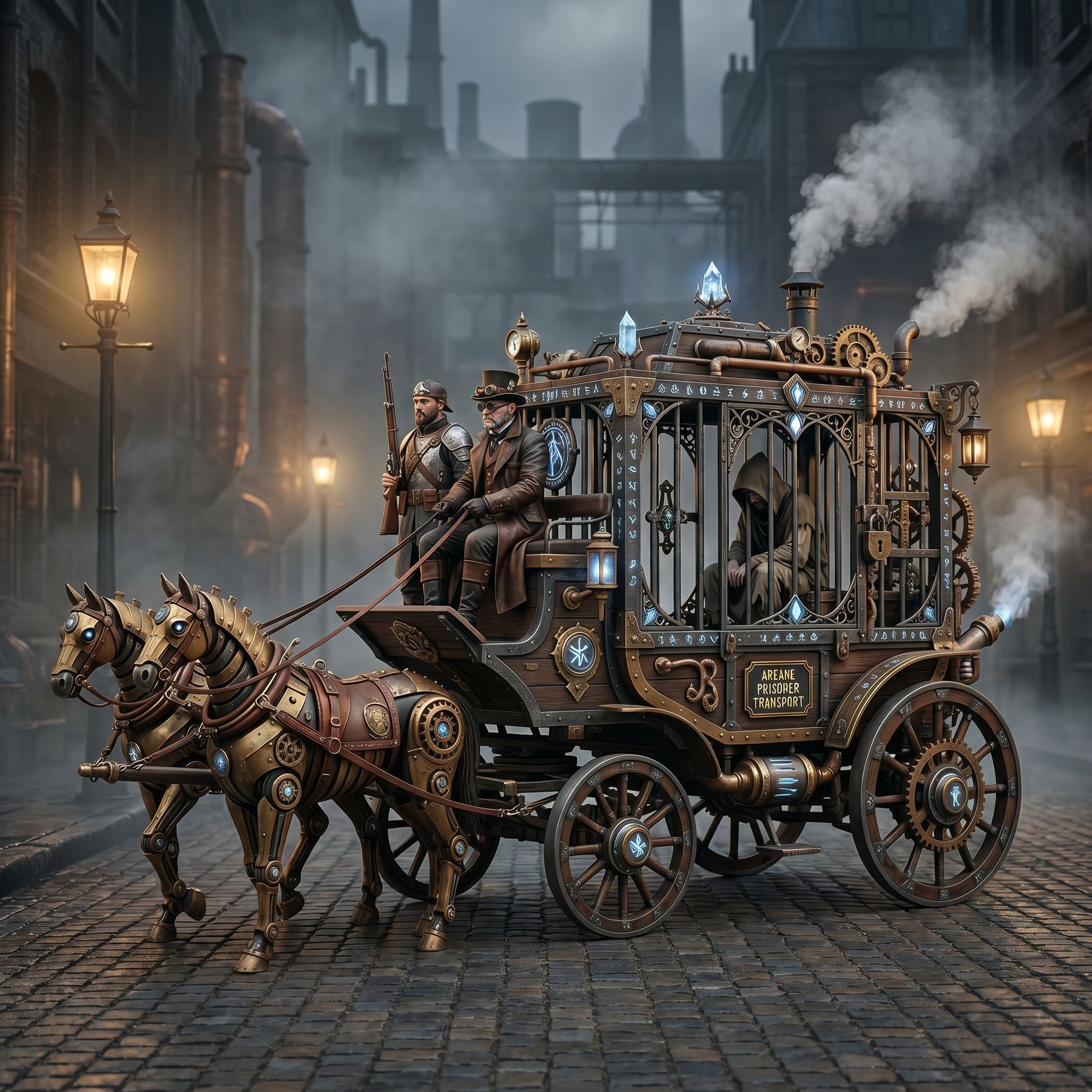
When a community shares a striking image like the Steampunk Horse Car, the real value lies not just in the final picture but in the workflow that produced it. The project, posted on 2026-04-27, showcases how creators can use an AI‑driven workspace to transform a stylistic idea into a polished, game‑ready asset. By deconstructing the prompt, the canvas process, and the finishing steps, teams can replicate this success for their own image‑and video‑generation needs – whether they are building game prototypes, ecommerce product renders, or marketing videos.
Understanding the Community Workflow
The source image is labeled as a "Steampunk Horse Car" and categorized under Game Design. The prompt provided by the creator is a concise Chinese instruction: “把这个风樊转换成 unreal engine 漫射的风樋” ("Convert this style to Unreal Engine rendering style"). This single line tells us three things:
1. Visual Goal – The creator wants a steampunk aesthetic rendered with the high‑fidelity, ray‑traced look typical of Unreal Engine. 2. Reference‑Guided Editing – The prompt is a directional cue that the AI canvas can interpret and refine. 3. Cross‑Platform Compatibility – The final output is intended for a game engine, not just a static image.
By studying this workflow, any creator can see how a clear, style‑specific prompt drives the AI toward a production‑ready result.
Prompt Engineering for Unreal Engine Style
A good prompt acts as a bridge between concept and engine‑ready asset. The community example demonstrates several best practices:
Specificity – "Steampunk Horse Car" narrows the subject, while "Unreal Engine rendering style" defines the visual pipeline. Technical cues – Mentioning the engine name signals lighting, material, and post‑process expectations. Cultural context* – The Chinese phrasing shows how multilingual prompts can be leveraged in a global AI workspace.
When crafting prompts for Vibart, keep them concise yet descriptive. Include keywords for lighting (e.g., "ray‑traced lighting"), material (e.g., "metallic rust"), and composition (e.g., "dynamic angle, low‑poly stylization"). This level of detail helps the AI generate assets that require minimal post‑production tweaking.
Leveraging Vibart's Canvas Layers
Vibart positions itself as an AI creative workspace with editable canvas layers, typography control, and crop variants – all essential for game asset pipelines. The Steampunk Horse Car workflow likely follows these steps:
1. Initial Generation – The AI produces a base image based on the prompt. 2. Layer Extraction – Creators can separate foreground (horse, carriage), midground (environment), and background (sky, fog) into distinct layers. 3. Reference‑Guided Editing – Using reference images, creators adjust material properties, color grading, and texture details per layer. 4. Typography & Details – If the project includes UI elements or signage, the built‑in typography tools let creators add or modify text without leaving the canvas. 5. Crop Variants - Generate multiple aspect ratios (16:9 for cinematic shots, 1:1 for inventory icons) directly from the same layer stack.
By working within a layered canvas, teams can iterate faster, maintain brand consistency, and produce assets that are ready for integration into game engines or ecommerce platforms.
Reference‑Guided Editing for Brand Consistency
Even the best AI cannot always capture exact brand guidelines on the first try. The community project underscores the importance of reference‑guided editing:
Upload Reference Assets – Bring in existing brand colors, logos, or style guides into Vibart. Align Layers – Use the reference overlay to fine‑tune hue, saturation, and material properties. Batch Adjustments* – Apply the same edits across multiple layers to keep the visual language uniform.
This approach is especially valuable for ecommerce sellers who need product images that match a brand palette, and for marketers who require consistent visual storytelling across ad videos.
Production‑Ready Export for Game Assets
The ultimate goal of the Steampunk Horse Car prompt was Unreal Engine compatibility. Vibart supports production‑ready exports that preserve layer information and material nodes. Key export considerations include:
File Format – Use formats like .FBX or .GLTF when geometry and textures are needed. Resolution & Compression – Set output resolution to match target platform (e.g., 1920 × 1080 for high‑end PC, 1024 × 1024 for mobile). Metadata* – Include tags for easy asset management within game engines.
By exporting directly from Vibart, creators avoid time‑consuming conversions and can plug assets straight into their development pipeline.
Tips for Ecommerce and Marketing Creatives
While the community example focuses on game design, the same workflow applies to commercial visual production:
Product Image Generation – Use the same prompt structure to create multiple product variants (e.g., "Ecommerce product, metallic finish, studio lighting, Vibart canvas"). Ad Video Generation – Leverage the reference‑guided editing to keep branding consistent across video frames. Canvas Reuse* – Save successful layer configurations as templates for future campaigns, reducing prompt‑writing time.
These practices help marketers and ecommerce sellers produce high‑quality visuals at scale, without sacrificing brand integrity.
Final Thoughts
The Steampunk Horse Car community work is more than a showcase; it is a blueprint for an AI‑first creative workflow. By mastering prompt specificity, utilizing Vibart's layered canvas, applying reference‑guided editing, and exporting production‑ready assets, creators can accelerate asset creation across game design, ecommerce, and marketing domains. The workflow demonstrates how an AI creative workspace can serve as a versatile hub for turning ideas into engine‑ready or market‑ready visuals, making it a strong alternative for teams seeking efficiency and consistency.
Ready to apply these insights? Explore Vibart's AI canvas tools and start building your own production‑ready asset pipelines today.
Sources and further reading
The workflow and platform rules in this article are grounded in these primary references. Confirm current rules for your market and channel before publishing.
- Vibart community work: Steampunk Horse CarVibart community · 2026-04-27
Next step: make one asset with the same workflow
Do not stop at the comparison page. Upload a reference, generate a direction, then keep copy and brand elements editable on the canvas.