Want to turn this into production assets?
Open Vibart to generate images or videos, then finish brand text, crops, and export-ready layouts on the canvas.
Turning a Community Prompt into a Production‑Ready Asset
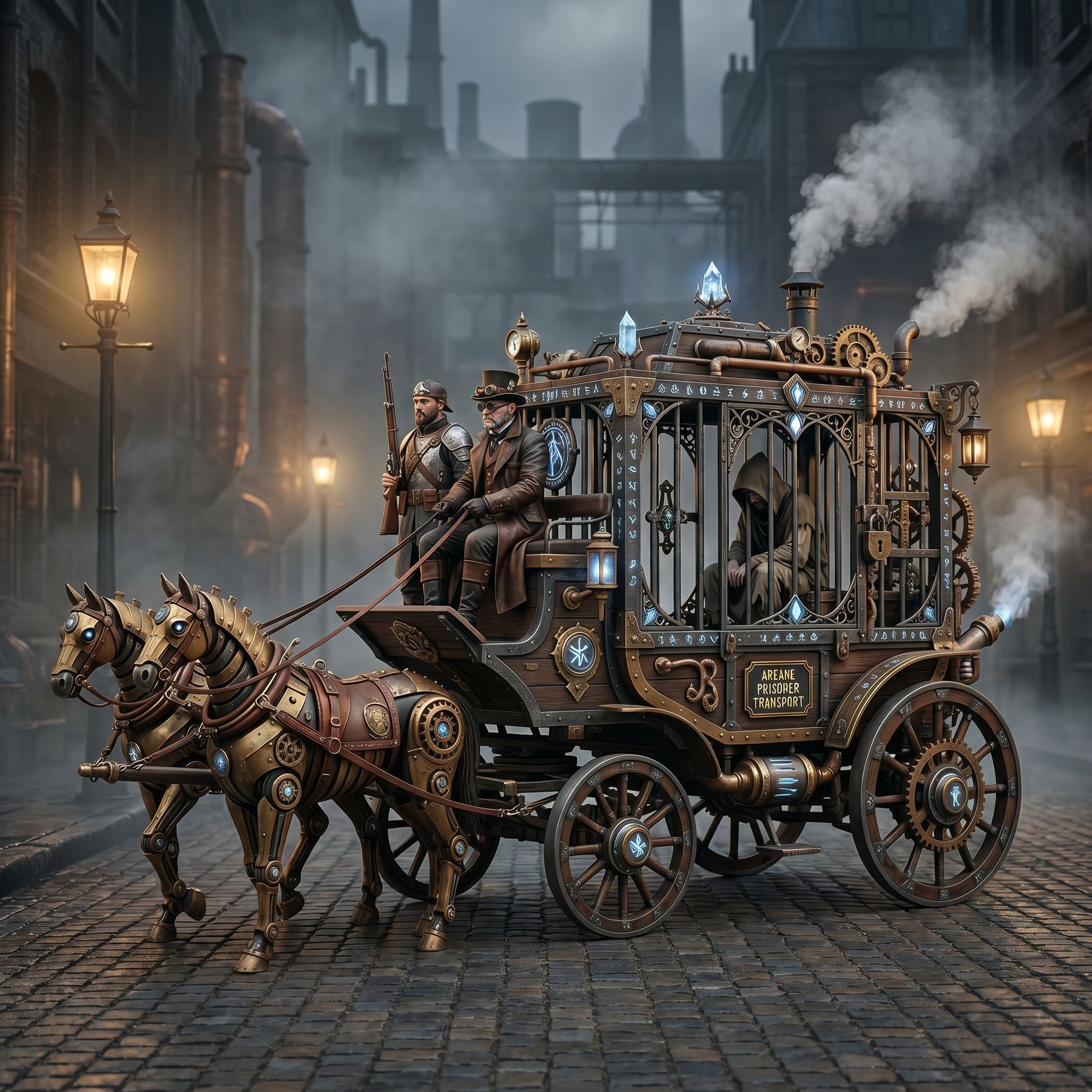
The Vibart community spotlight on April 27 2026 featured a “Steampunk Horse Car” image. The original artwork shows a detailed horse‑drawn carriage in a Victorian‑steampunk aesthetic. The accompanying prompt asked creators to “convert this style into Unreal Engine rendering style.” This simple instruction illustrates a complete AI‑driven creative workflow that designers, ecommerce sellers, and marketers can replicate today.
1. Understand the Visual Direction The steampunk theme combines ornate metalwork, brass accents, and aged textures with a fantasy vehicle concept. By examining the image, creators can identify three key visual elements: Material palette – weathered metal, leather, and warm copper tones. Lighting style – dramatic, high‑contrast illumination typical of Unreal Engine real‑time rendering. Composition* – centered vehicle with dynamic angles that emphasize depth.
These observations become the reference points for the AI prompt.
2. Craft an Effective Prompt A clear prompt tells the AI what transformation is needed. In this case the prompt “把这个风格转换成 unreal engine 渲染的风格” (Convert this style into Unreal Engine rendering style) tells the model to: Preserve the steampunk silhouette. Apply realistic metal shaders and physically based rendering (PBR) materials. * Use cinematic lighting and depth‑of‑field effects common in Unreal Engine.
When writing prompts for Vibrant AI tools, keep them concise, specify the desired rendering engine or style, and mention any required attributes (e.g., “high‑resolution, 4k, editable layers”).
3. Generate the Base Image Using Vibart’s image generation feature, designers can upload the original steampunk sketch or select a similar reference. The platform’s diffusion model interprets the prompt and produces a base render that already incorporates Unreal Engine‑style lighting and materials. Because the workflow is canvas‑based, the output appears as a layered image that can be edited further.
4. Refine with Reference‑Guided Editing The “reference image editing” capability lets creators keep brand consistency. If the steampunk horse car is intended for an ecommerce product line, the designer can: Align the vehicle’s color scheme with existing brand assets. Adjust typography on signage or labels using Vibart’s typography control. * Crop variants for different ad placements (e.g., square for Instagram, landscape for banner ads).
Each edit is performed on separate canvas layers, preserving the original while allowing non‑destructive modifications.
5. Produce Production‑Ready Exports Once the visual is finalized, Vibart offers export options that meet ecommerce and marketing needs: High‑resolution PNG/JPEG for product pages. WebP for faster loading. SVG for vector‑based assets like logos or UI elements. Video generation (if motion is required) using the same canvas workflow, enabling short promotional clips that showcase the steampunk horse car in action.
These export choices ensure the asset is ready for immediate deployment across channels.
6. Apply the Workflow to Real Projects The community example demonstrates a repeatable process: 1. Select a reference image (the steampunk horse car). 2. Write a concise prompt that defines the target style (Unreal Engine rendering). 3. Generate a base asset with Vibart’s AI image engine. 4. Edit layers to align colors, typography, and composition with brand guidelines. 5. Export the final image or video in the required format.
By following these steps, designers can accelerate concept art, product visualisation, and ad creative production without leaving the Vibart environment.
7. Benefits for Different Roles Designers gain a rapid prototyping tool that respects detailed artistic direction. Ecommerce sellers can generate multiple product‑image variants quickly, maintaining visual consistency. Marketers obtain ready‑to‑use assets for social media, email campaigns, and display ads. Founders can prototype branding concepts without hiring additional illustrators.
8. Key Takeaways A clear, style‑focused prompt is the foundation of an effective AI workflow. Canvas‑based editing lets creators keep full control over layers, colors, and typography. Vibart’s production‑ready export options streamline the hand‑off to developers or print partners. The same workflow applies to video generation, enabling dynamic ads that showcase AI‑generated imagery.
--- Ready to try this workflow yourself? Start creating with Vibart today and turn any community prompt into a polished, production‑ready asset.
Call to Action: Start Your AI Design Workflow → /
Sources and further reading
The workflow and platform rules in this article are grounded in these primary references. Confirm current rules for your market and channel before publishing.
- Vibart community work: Steampunk Horse CarVibart community · 2026-04-27
Next step: make one asset with the same workflow
Do not stop at the comparison page. Upload a reference, generate a direction, then keep copy and brand elements editable on the canvas.