Comparing Lovart or AI design agents? Test the production workflow.
Generate with references, then finish headlines, logos, offer text, crops, and export-ready layouts in the Vibart canvas.
Introduction
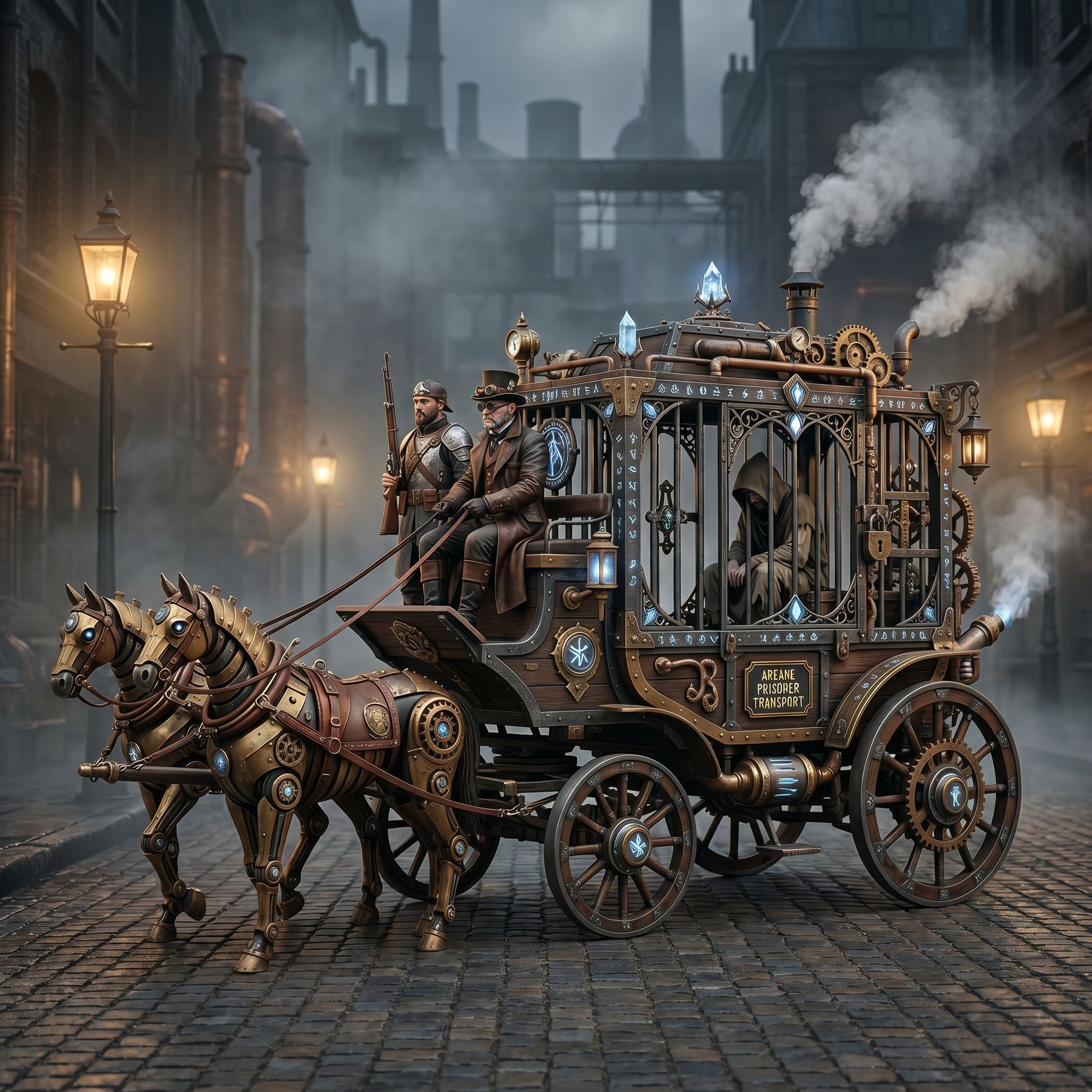
The Vibart community spotlight on April 27, 2026 featured a steampunk horse car illustration that was created through an AI design workflow. The image, categorized under Game Design, was generated from a prompt that asked to convert the original style into an Unreal Engine rendering style. This article extracts practical steps that designers, ecommerce sellers, and marketers can apply when using Vibart’s AI creative workspace to produce reference‑guided, production‑ready visual assets.
Understanding the Prompt and Visual Direction
The community prompt, written in Chinese, instructed the AI to “把这个风格转换成 unreal engine 渲染的风格” – essentially to re‑render the existing steampunk horse car using the high‑detail, real‑time shading typical of Unreal Engine. The key takeaway is that a clear visual direction, combined with a specific rendering style, guides the AI to produce a result that matches the intended aesthetic. Designers can replicate this by describing the desired style (e.g., “Unreal Engine cinematic lighting”, “high‑poly textures”, “real‑time shadows”) alongside the subject matter.
Leveraging Vibart’s Image Generation
Vibart’s image generation module allows users to input a descriptive prompt and receive a raster image that aligns with the specified style. By feeding the prompt about converting to Unreal Engine rendering, the AI can synthesize a steampunk horse car that features metallic armor, Victorian‑era carriage details, and realistic lighting. The generated image serves as a visual reference for further editing, ensuring that the final asset retains the intended thematic elements while benefiting from AI‑driven detail.
Reference‑Guided Editing and Canvas Layers
After generation, Vibart provides an editable canvas where each element – the horse, the carriage, background scenery – can be isolated into separate layers. This reference‑guided editing enables precise adjustments, such as tweaking the horse’s pose, refining the carriage’s metal textures, or altering the lighting to match a brand’s color palette. Because the layers are editable, designers can maintain brand consistency across multiple product images, a crucial requirement for ecommerce sellers who need uniform visual assets.
From Canvas to Production‑Ready Export
Vibart’s workflow supports exporting the final composition in various formats optimized for different channels. Designers can generate multiple crop variants for thumbnail, main product, and lifestyle images, and apply typography control for price tags or promotional text. Additionally, the platform’s video generation capability can turn the static steampunk horse car into a short promotional clip, complete with dynamic camera moves and animated lighting, which is valuable for ad campaigns. All exports are production‑ready, meaning they meet the resolution and file‑type specifications required by major ecommerce platforms and marketing channels.
Practical Takeaways for Designers and Ecommerce Sellers
1. Define a clear visual direction in the prompt, specifying the rendering engine or style you want the AI to emulate. 2. Use Vibart’s reference‑guided editing to break the image into editable layers, allowing fine‑tuned modifications without starting from scratch. 3. Exploit the canvas’s export options to create multiple asset sizes and formats, ensuring that each product image meets the exact requirements of the sales channel. 4. Combine static image generation with video generation for richer ad creatives, enhancing engagement without leaving the Vibart environment.
By following this workflow, creators can turn a community‑shared concept like the steampunk horse car into a versatile set of marketing assets that are consistent, high‑quality, and ready for immediate deployment.
Sources and further reading
The workflow and platform rules in this article are grounded in these primary references. Confirm current rules for your market and channel before publishing.
- Vibart community work: Steampunk Horse CarVibart community · 2026-04-27
Next step: make one asset with the same workflow
Do not stop at the comparison page. Upload a reference, generate a direction, then keep copy and brand elements editable on the canvas.